Stop responding to strangers. Meet the person who buys.
Federal contracting is a relationship business. Yet most small companies never learn who the human buyer is; they answer a solicitation from a stranger and hope. KO Search puts the actual contracting officers behind your market in front of you: who they are, what they buy, and how to reach them.
You don't have a pipeline problem. You have a stranger problem.
When a solicitation drops in your market, do you know the officer who wrote it, or are you meeting them for the first time in the response?
Who actually signs the awards in the agencies you sell to? Could you name three of them?
The incumbents who keep winning: do they know these officers, or did they get lucky?
If a buyer for exactly what you do is one email away, why is your first contact a proposal?
How many good-fit opportunities did you never hear about because nobody at that office knows you exist?
Find the officers who actually buy what you sell.
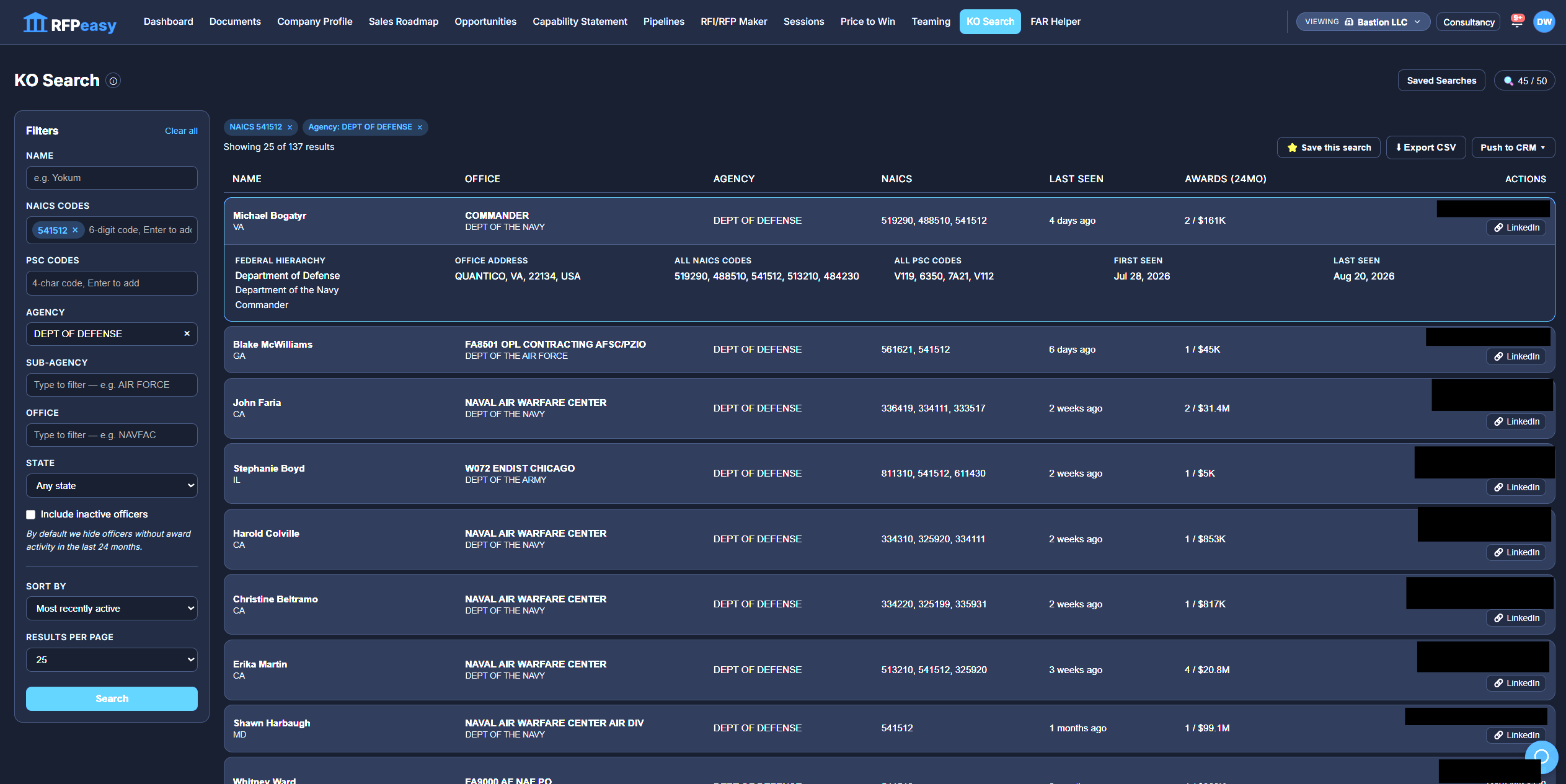
Filter by the NAICS and PSC codes you work, the agencies, sub-agencies and offices you target, or the state you want to be near, and KO Search returns the real contracting officers behind that spend. Not a generic agency directory. The specific people whose names are on solicitations in your market.
Search a code you know. Get back people you can call.

See how much they buy, and how recently, before you ever reach out.
Every officer carries their own signal: how many awards they've touched in the last 24 months, the total dollars behind them, when they first showed up, and when they were last active. Sort the whole list by most recent activity, most awards, or highest contract value, so the busiest buyers in your market rise to the top instead of hiding in an alphabetical list.
A busy buyer who was active last week is a very different call than a name last seen three years ago.

Know the office behind the name, not just the name.
Expand any officer and KO Search lays out the full federal hierarchy (parent agency, sub-agency, and the specific contracting office) plus the office address and every NAICS and PSC code that officer buys under. That's the map you need to understand where a buyer sits, who they answer to, and what else they purchase.
The agency is where the money lives. The office is where the decision gets made.
Get a way in, instead of a cold guess.
Where SAM.gov published it, KO Search shows the officer's email and phone right on the row, so a real contact path is one click away. For everyone else, a one-click LinkedIn search opens that exact person by name and office, so you're researching a human being, not blasting an inbox nobody reads.
Not a mass-mail machine. A way to start a real conversation with a real buyer.
Two ways to enter a federal market.
- You meet the buyer for the first time inside your proposal
- You find out about the requirement the day it posts
- You compete on paper against incumbents the officer already knows
- Your outreach is a guess at a generic agency inbox
- Every pursuit starts from zero relationship
- You know who signs the awards before anything is solicited
- You see which officers are active in your codes right now
- You understand the office's buying history and what else it purchases
- You have a name, a hierarchy, and a contact path to work
- The relationship exists before the opportunity does
Skip the names that stopped buying years ago.
By default, KO Search hides officers with no award activity in the last 24 months, so your list is the people actually spending today, not a stale roster. Want the full picture for a deep account map? Toggle Include inactive and see everyone. You decide when you're prospecting live buyers and when you're mapping the whole office.
Active by default. Complete when you ask for it.
Turn a search into a target list your team can work.
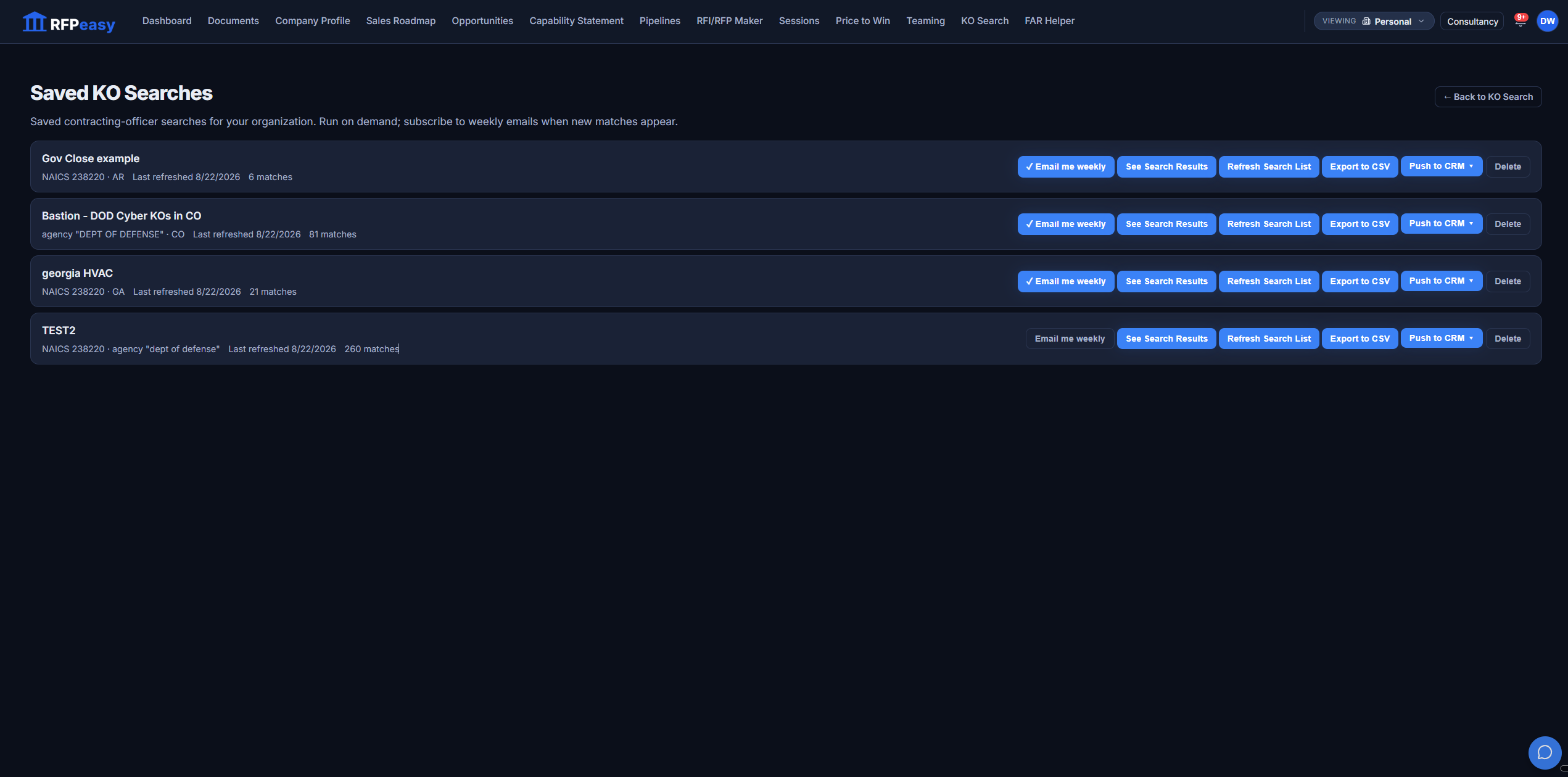
Found the officers who matter for a market? Save the search for your whole organization and it keeps working for you: subscribe to a weekly email when new matches appear, refresh the list on demand, export it to CSV for your account plan, or push it straight to your CRM. The work of finding your buyers happens once; then it's an asset, not a tab you'll never find again.
Build the buyer list once. Keep working it.
Knowing the buyer is where the rest of RFPeasy pays off.
Your Sales Roadmap ranks the offices; KO Search names the people inside them, and its data answers the recompete radar's most important question.
- Sales RoadmapThe deck ranks the top buying offices in your market; bring them here to find the officers behind the spend.
- Opportunities"Who buys this" on a recompete row is answered from KO Search's officer data.
- Capability StatementFound the office? Tailor the statement you send them to its agency and program.
Your next contract has a human buyer. Go meet them first.
~97,000 federal contracting officers from public SAM.gov data, FY21–FY26, searchable by your codes, your agencies, and your state. Stop answering solicitations from strangers.