Stop searching for contracts. Start knowing where to compete.
You already have access to thousands of opportunities. RFPeasy® scores them against your company, surfaces what is coming before the solicitation drops, and puts matching, search, recompetes, forecasts and market signals under one roof.
Finding more opportunities isn't the problem: you already have access to thousands.
Does this actually fit us?
Can we realistically compete?
Is it worth our team's time?
Are we already too late?
What is coming before the solicitation drops?
Your opportunities. Your priorities.
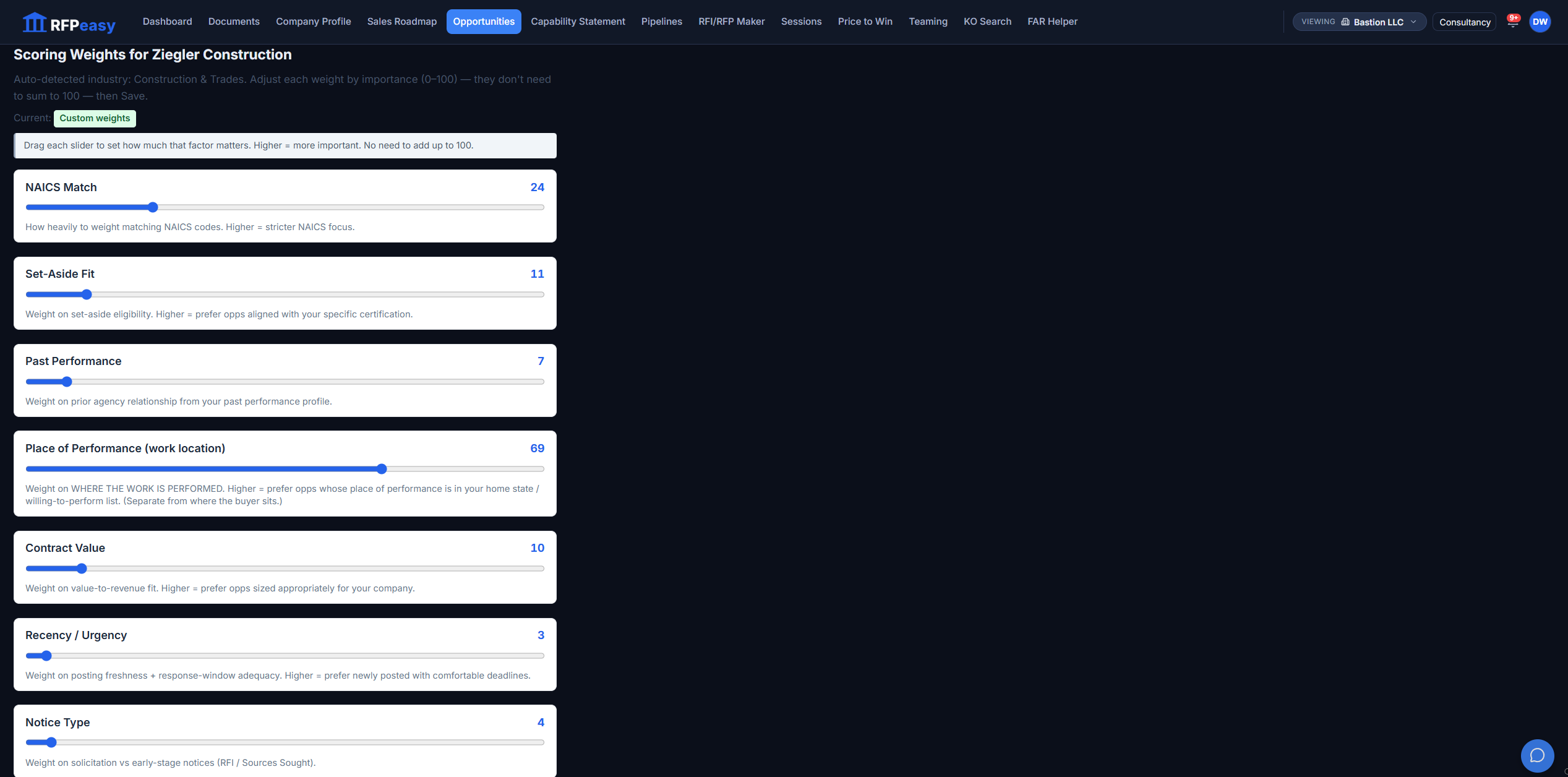
Not every contractor should get the same definition of a "best match." Open Scoring Weights and set how much each factor counts (NAICS match, set-aside fit, past performance, place of performance, value, recency, notice type) and the ranking recomputes for the selected company. A construction firm can push Place of Performance to 69; an IT shop leaves geography alone.
A match score shouldn't be a black box.
The score listens to words you choose.
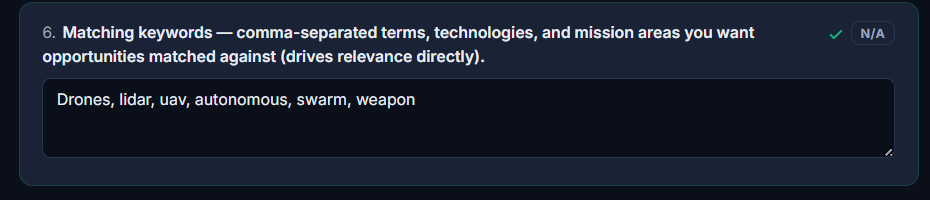
Behind the capability-keyword score sits one question in your Company Profile: the comma-separated terms, technologies and mission areas you want opportunities matched against. Change the words and the feed re-ranks around them.
Start with what fits.
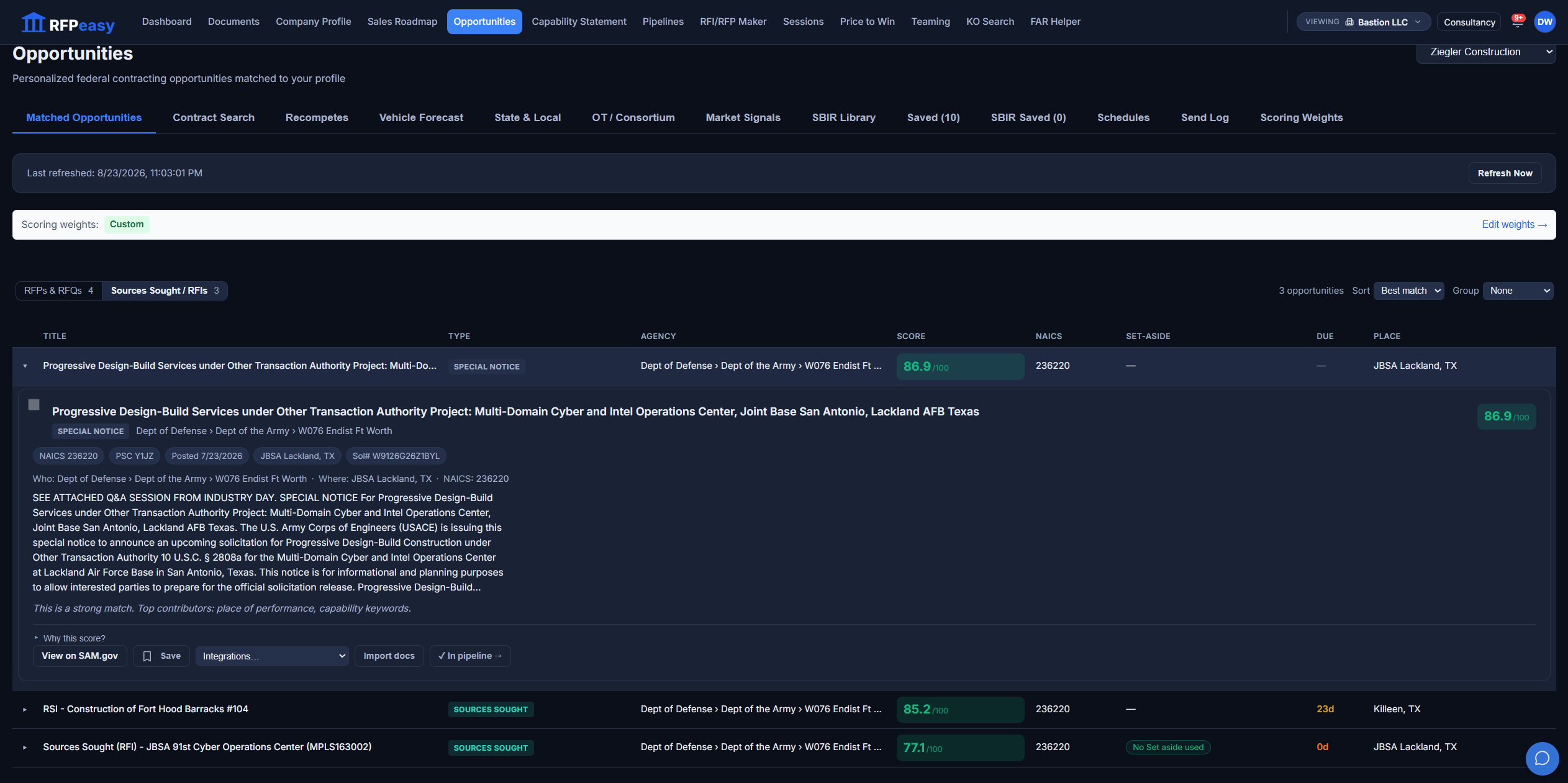
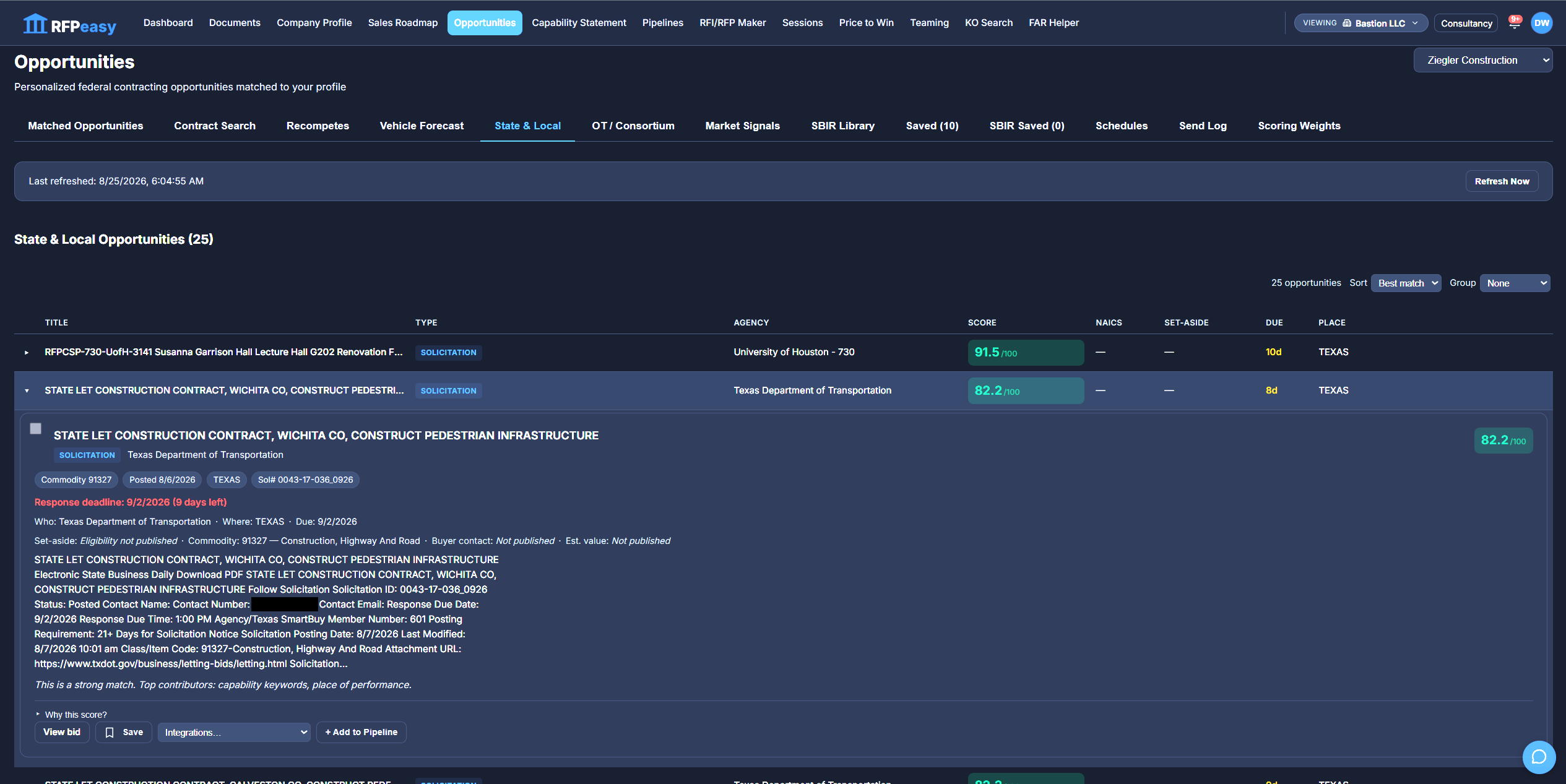
Instead of beginning every search from zero, RFPeasy surfaces opportunities matched against your company and ranks them by relevance. Scan the agency, notice type, NAICS, set-aside, deadline, location and score in one row, then expand an opportunity to read the requirement and see exactly what contributed: "This is a strong match. Top contributors: place of performance, capability keywords." Save the ones worth watching, import the solicitation documents, or push one straight into your pipeline.
Get into the conversation earlier.
A posted RFP is often the last moment to matter. RFPeasy surfaces Sources Sought and RFIs separately from RFPs and RFQs, so you can engage while an agency is still gathering market intelligence, before the requirement, the incumbent and the evaluation are fixed. The earliest notices are where positioning still changes the outcome.
See the recompete and the on-ramp before they surface.
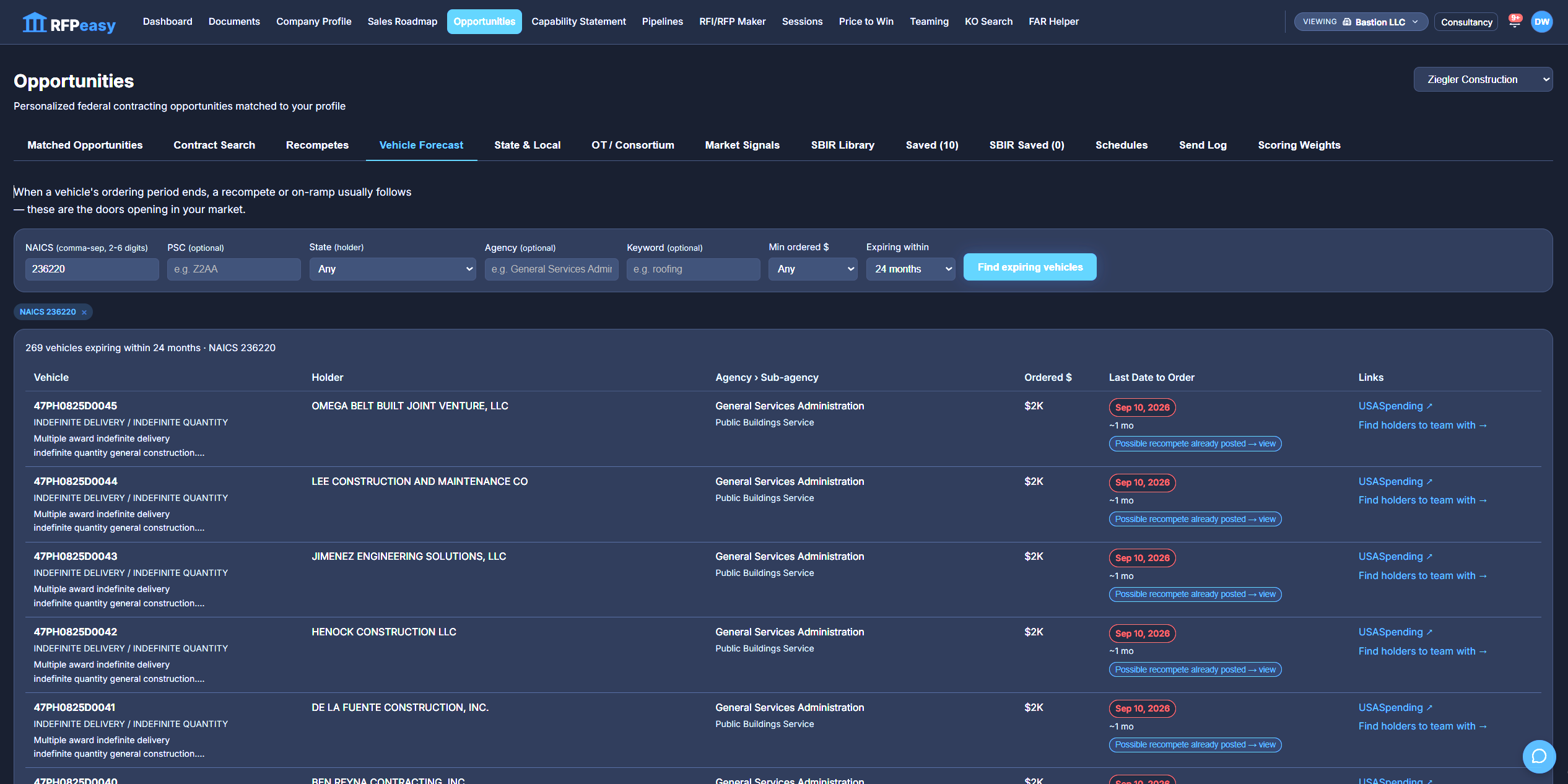
Vehicle Forecast reads expiring contract vehicles as forecasted on-ramps: every IDIQ in a NAICS whose ordering window is closing (269 within 24 months in the run shown), with its holder, agency, ordered dollars and last date to order. When a possible recompete has already posted, the row says so and links straight to it, to the holder on USASpending, and to a find-holders-to-team-with search.
A recompete found early is strategy. A recompete found late is an RFP.
Read the activity around your market, not just the notices in it.
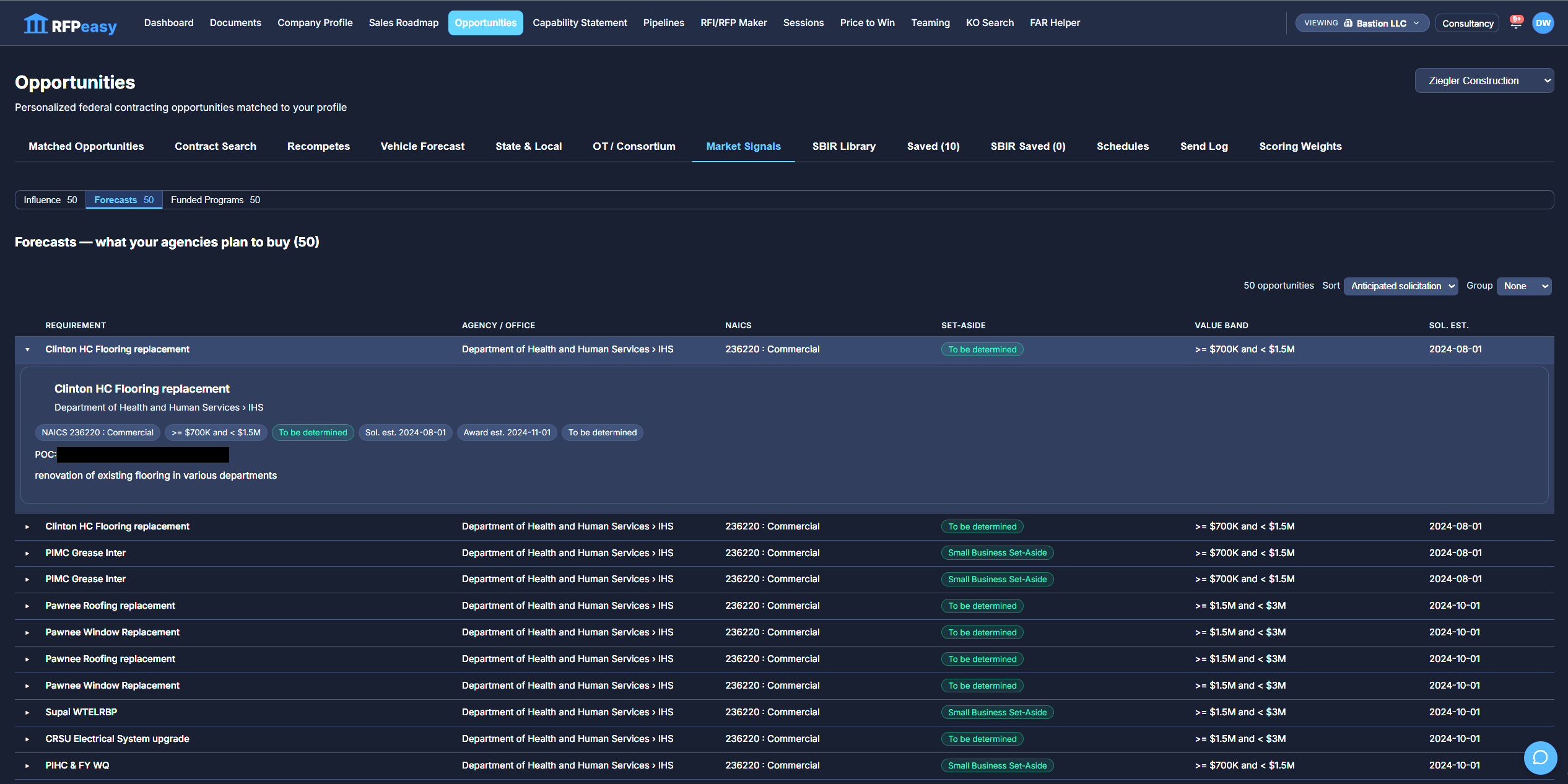
Market Signals watches three feeds around your agencies: Influence, Forecasts and Funded Programs, fifty signals each. Forecasts is the one that changes your calendar. It lists what your agencies plan to buy before anything is solicited: each requirement with its agency and office, NAICS, set-aside, value band and anticipated solicitation date. Expand a row and the forecast opens up with its estimated award date and the agency point of contact, months before there is a notice to respond to.
The work you can win is bigger than SAM.gov.
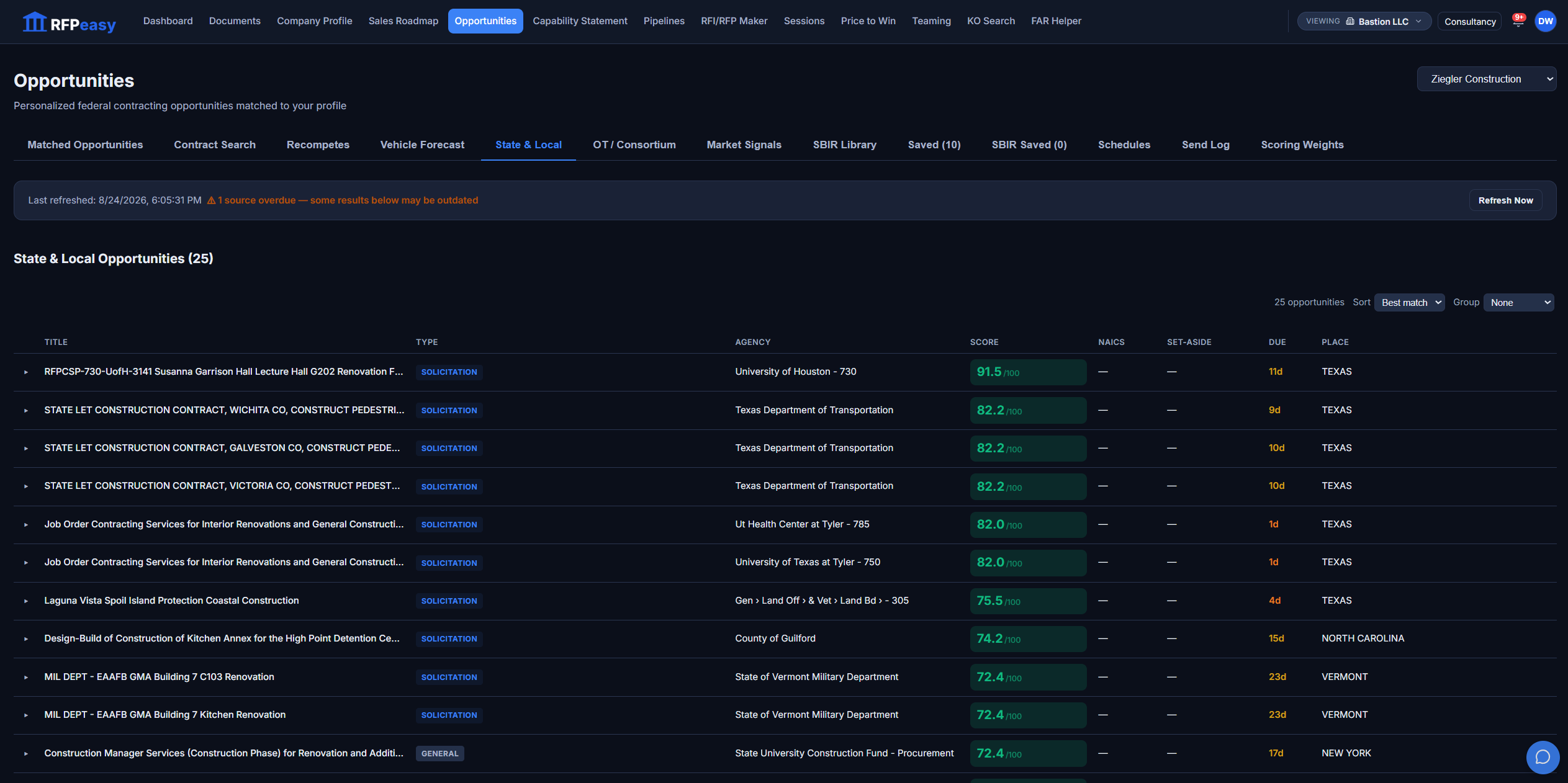
State & Local surfaces SLED opportunities alongside your federal feed (university systems, state DOTs, county governments), scored by the same engine against the same company profile, with the same expandable "why this score" explanation. OT / Consortium surfaces Other Transaction and consortium work, the non-FAR path onto emerging-technology programs. One place to see federal, state, local and OT together instead of three separate hunts.
Federal, state & local, and OT: one operating picture.
Discovery isn't done until the pursuit is tracked.
Expand any opportunity, federal or SLED, and the actions are on the row: Save it, view the source notice, or hit Add to Pipeline and it becomes a tracked pursuit in Contract Monitor, solicitation number, agency and deadline carried along. For federal notices, RFPeasy also imports the solicitation attachments automatically, so the documents are already waiting on the pursuit. Nobody rekeys anything.
Find the SBIR topics that fit your technology.
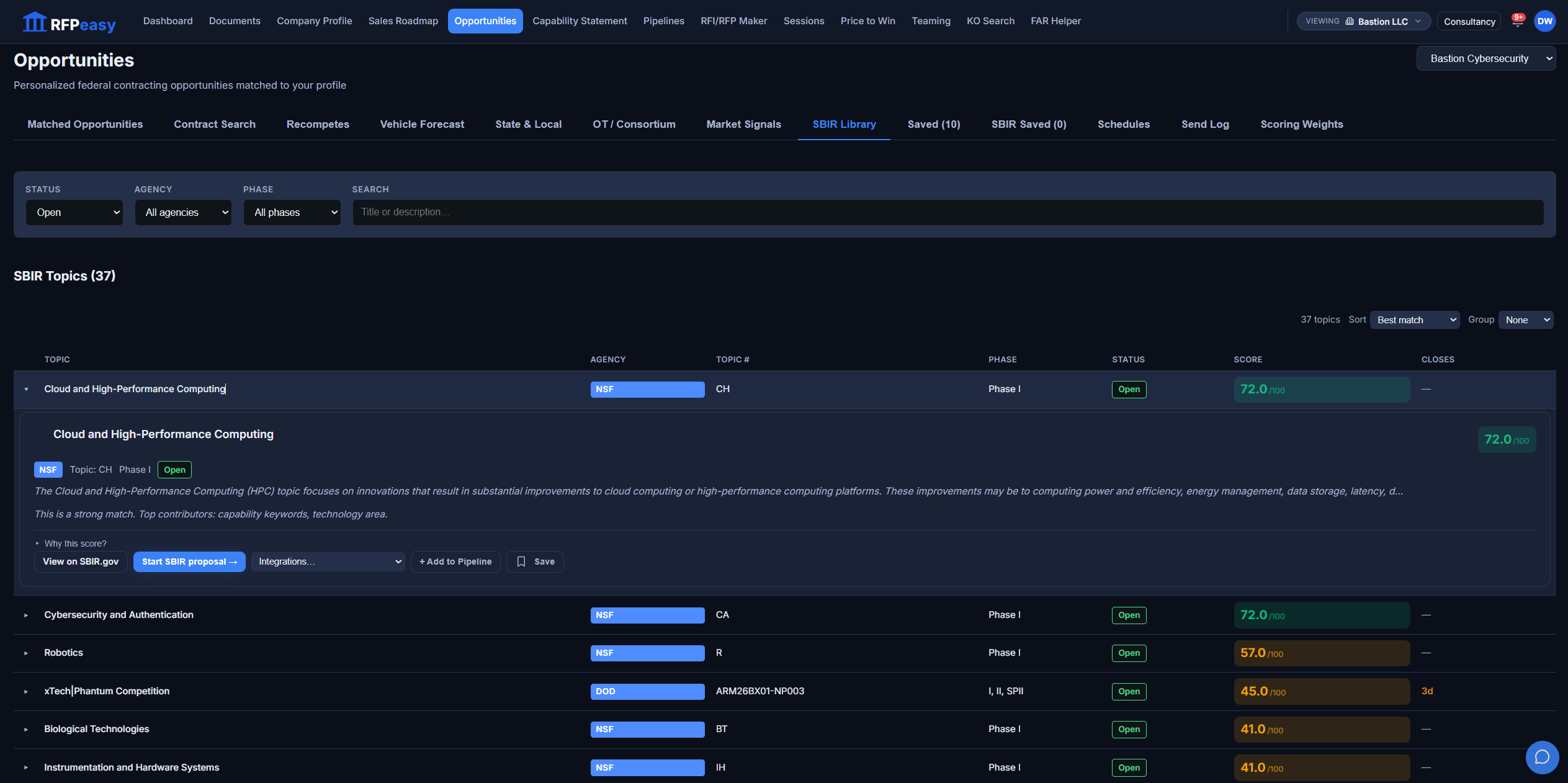
RFPeasy isn't merely displaying an SBIR database; the SBIR Library scores topics against your technology so you can see which ones actually fit. Filter by status, agency and phase, expand a topic to see what contributed to the match, then act from the row: Save it, Add to Pipeline as a typed SBIR item, or click Start SBIR proposal and land in the SBIR Maker with the topic already loaded.
Discover. Qualify. Start the proposal.
Sometimes you know exactly what you're looking for.
Contract Search runs a manual SAM query with the filters you would expect: set-aside, keywords (ANY/ALL), NAICS, PSC, notice type, contract vehicles, agency, state, posted dates, deadlines, contract value and open responses. Save a search to reuse it, and add any result to your pipeline. Matching and manual search live side by side; you always have both.
Searching for contracts vs. knowing where to compete.
- Start every search from an empty box
- Read the requirement for the first time in the RFP
- Find out about the recompete when it reposts
- One federal source, one notice type at a time
- No sense of whether it actually fits you
- Opportunities pre-scored against your profile
- The score opens up so you see why it fits
- Vehicle Forecast and Recompetes surface it early
- Federal, state & local, OT and SBIR in one view
- Save it, or push it straight into your pipeline
The opportunity you found is the pursuit you run.
Discovery is the front of one connected pipeline: what feeds the matching, and where a found opportunity goes next.
- Company ProfileYour matching keywords and service regions drive every score on this page; sharpen the profile and the feed re-ranks around it.
- Contract Monitor/PipelineAdd to Pipeline turns a notice into a tracked pursuit, with solicitation attachments imported automatically.
- RFP / RFI MakerImport an opportunity's documents and start the analysis on them; SBIR topics open straight into the SBIR Maker.
- TeamingExpiring-vehicle rows link to a find-holders-to-team-with search; recompete rows carry a find-teaming-partners action.
Start knowing where to compete.
Matched opportunities, contract search, recompetes, vehicle forecasts, state & local, OT/consortium, SBIR and market signals, prioritized around your company, in one place.