Stop bidding alone. Start building the team that wins.
A $40M prime award is not a solo bid; it never was. RFPeasy® finds the partners who close your gaps, hold the vehicles you need, and have actually delivered the work, then scores each one against your company.
Finding a company is easy. Finding the right partner is the hard part.
Do they actually do the work you cannot?
Have they really won federal work, or do they just say they can?
Do they hold the contract vehicle this award runs on?
Are they registered and eligible in SAM.gov right now?
Would teaming with them help you meet the set-aside?
And how do you reach them without starting from a blank page?
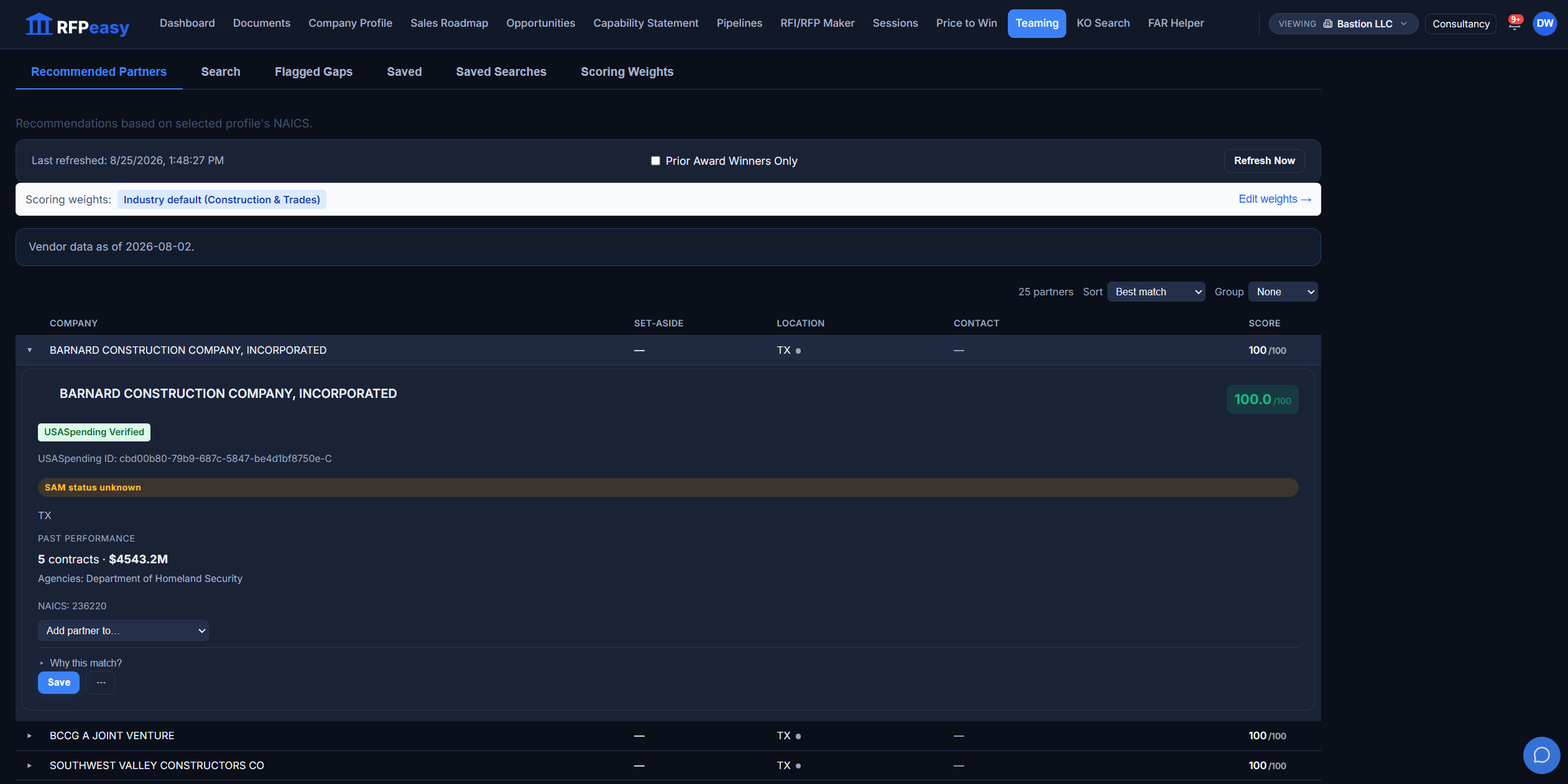
Partners already matched to your company.
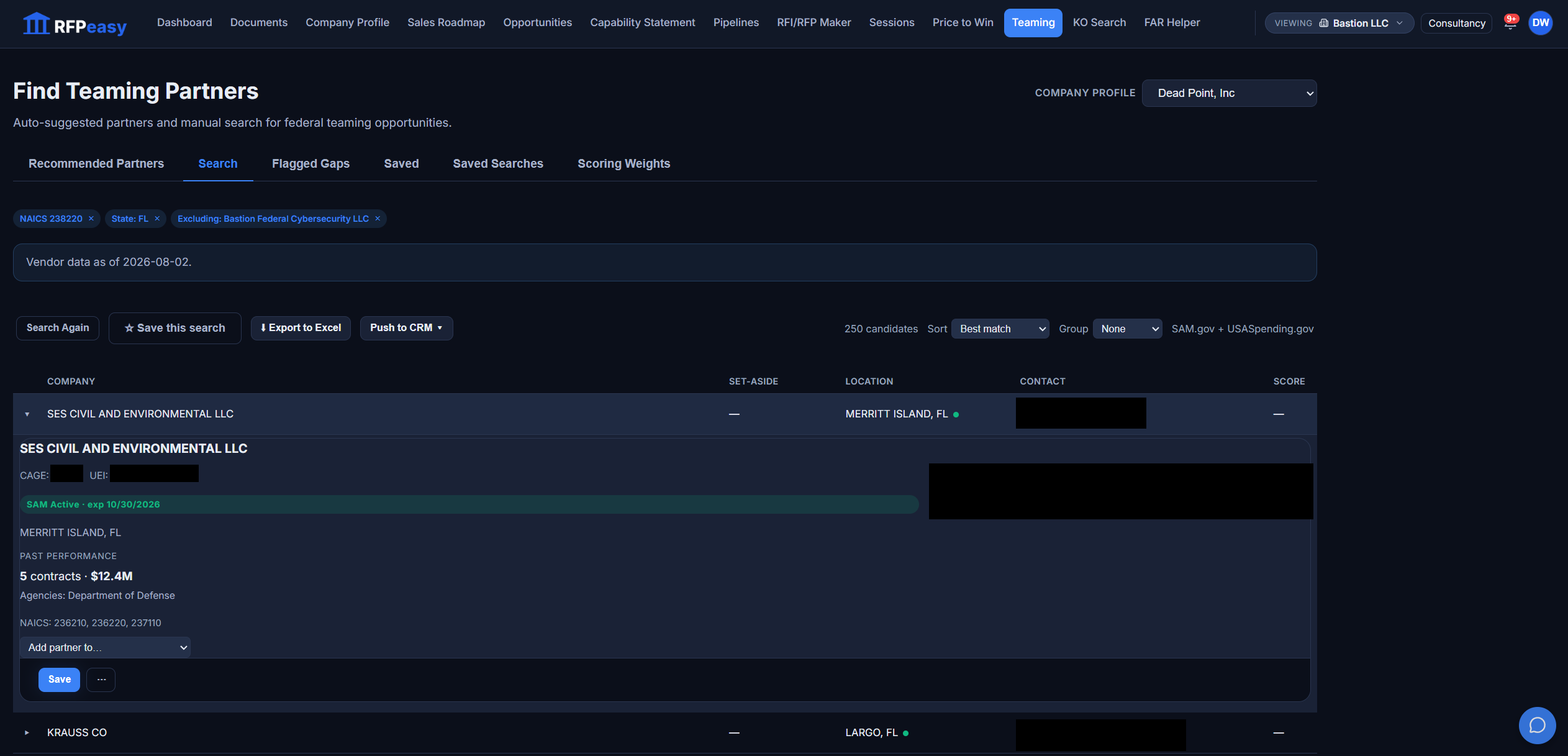
You should not start a partner search from an empty box. RFPeasy reads your company profile (your NAICS codes, past performance and certifications) and surfaces a ranked list of companies that complement what you do, scored against industry-default or custom weights. Every card is honest about its evidence: a USASpending Verified badge where the award history is documented, a plain "SAM status unknown" where it is not, and a vendor-data freshness date over the whole list.
The shortlist is built before you ask for it.
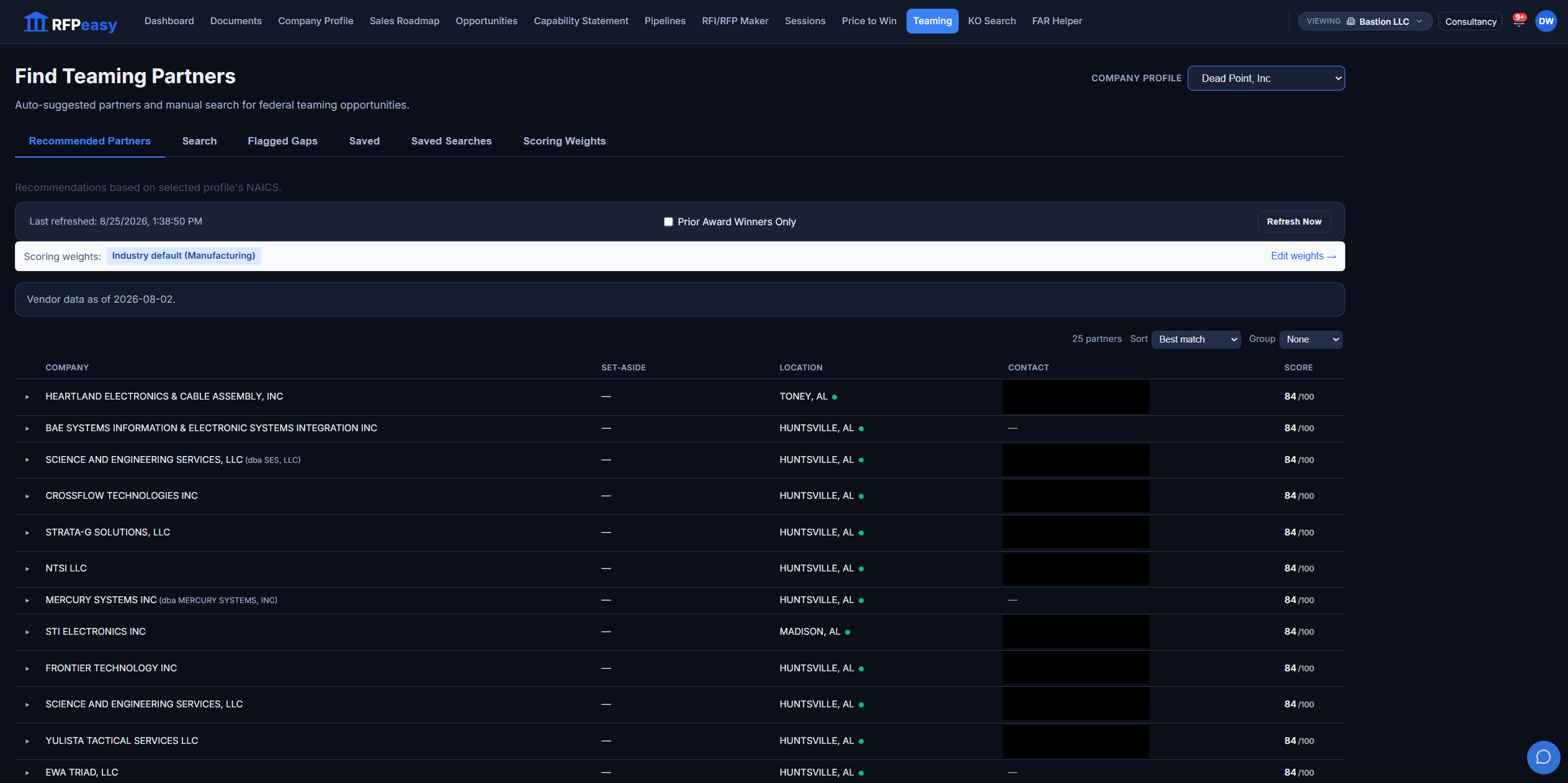
One search form. Three ways into the market.
Three toggles match how teaming actually works: Prior Award Winners Only for documented federal award history, Vehicle Holders for the primes holding the MATOCs and IDIQs in your NAICS, and Proven Subs for subcontractors with a real subaward track record. Then narrow by codes, certifications, agency, state (or a radius around the place of performance) and describe what you need in plain language.
You do not have to hold the vehicle. You have to know who does.
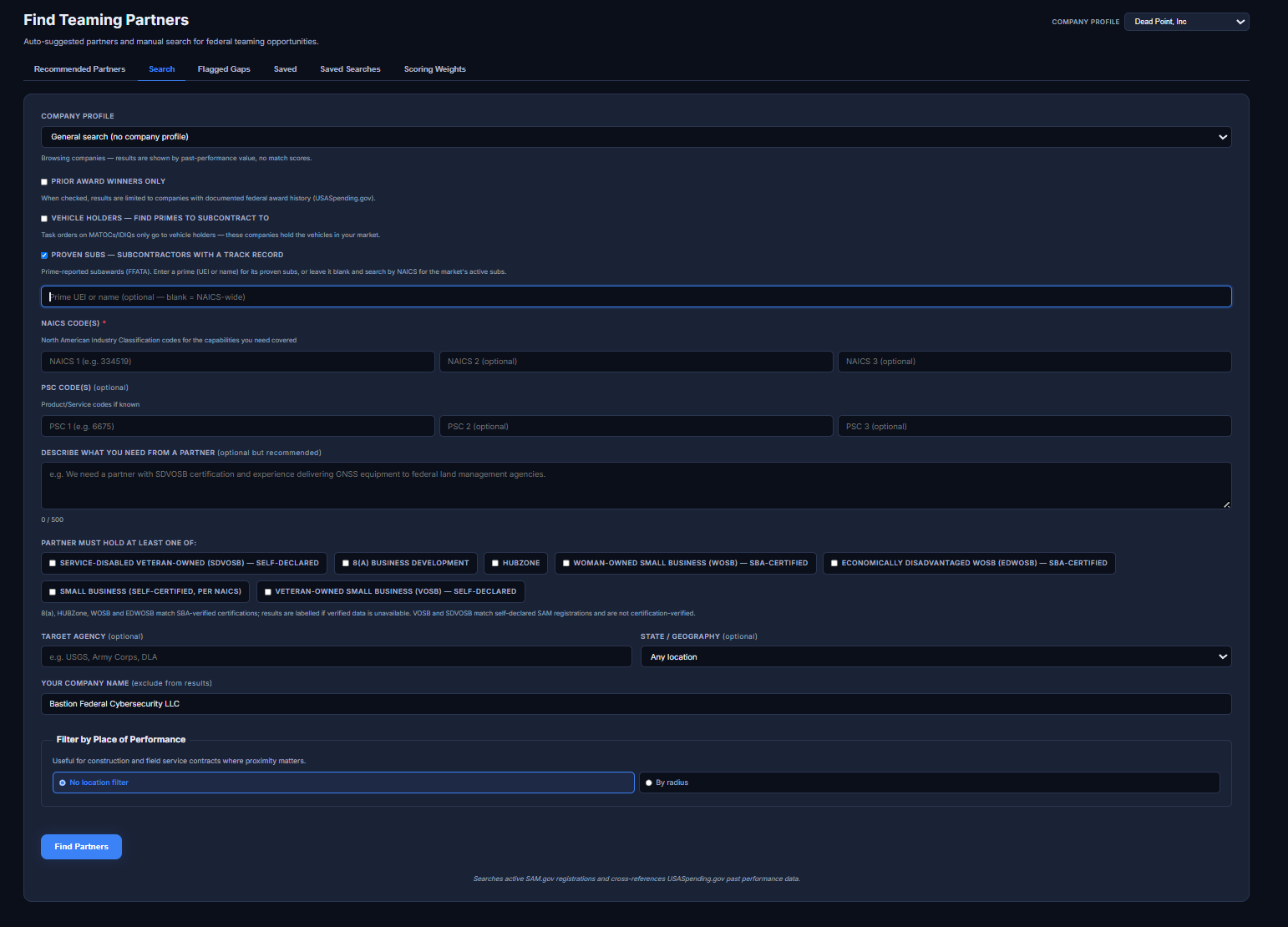
Find the subs that primes already trust.
Proven Subs searches the federal subaward record itself: prime-reported FFATA transactions, not directory listings. Every result carries its subaward dollars, its transaction count, the date of its last subaward, and the primes it has actually delivered for. The page is honest about the data too: FFATA reporting is incomplete, so a missing record is never treated as proof that no relationship exists. When the list is right, export it to Excel, push it to your CRM, or save the search and run it again next quarter.
A sub with 82 transactions on the record is not a guess.
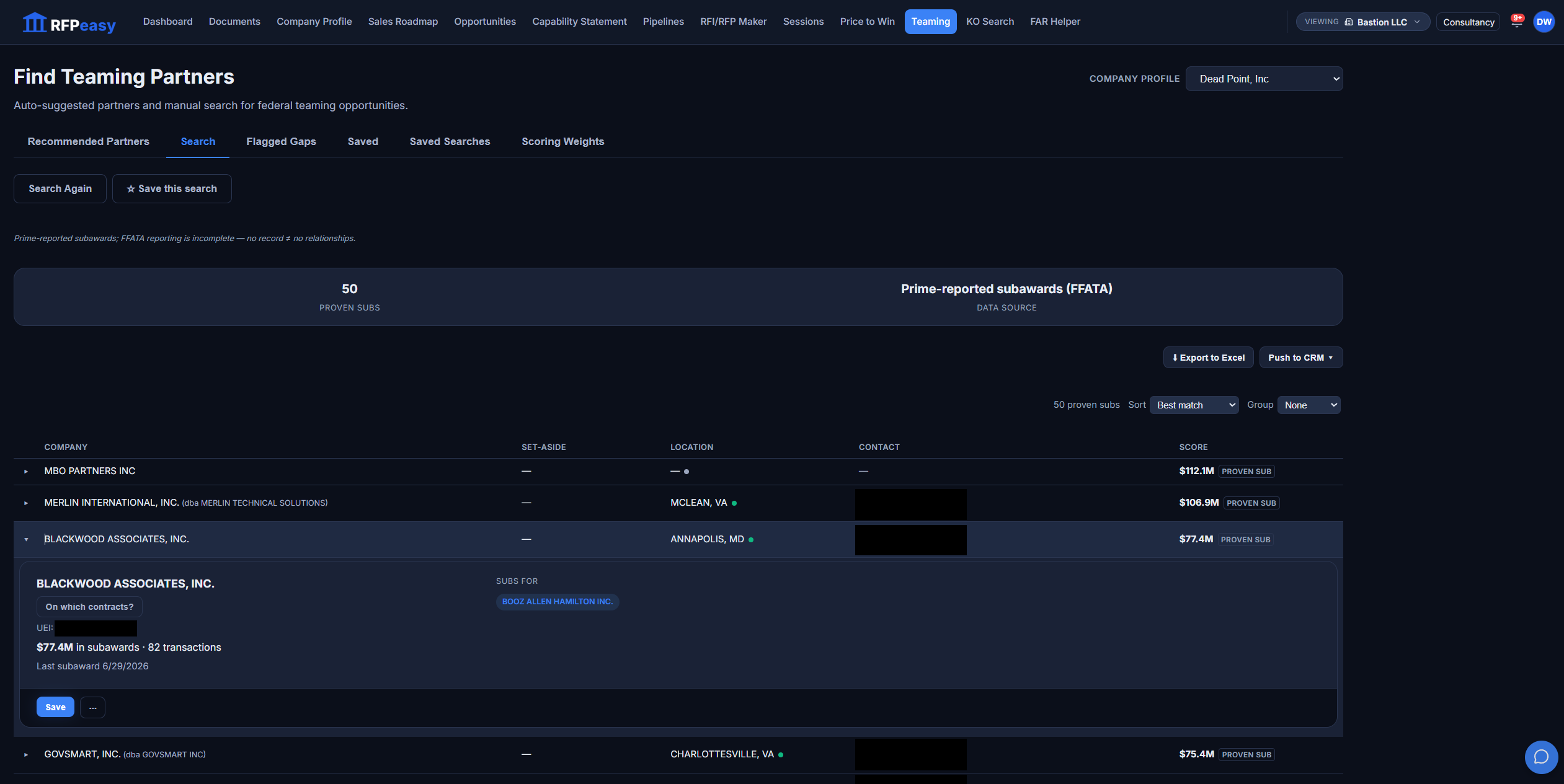
Open the card. See the whole company.
Every result expands into a partner card built from SAM.gov and USASpending.gov: live SAM registration status with its expiration date, documented past performance with contract counts, dollars and agencies, and the NAICS codes the company actually wins under. Partners whose SAM registration has lapsed are dropped from standard results rather than dressed up. You can also exclude a company by name, so a consultant search never recommends the client it is running for. When a partner fits, add it to a tracked pipeline pursuit straight from the card.
Registration, past performance and codes, checked before the first call.
How teaming partners actually get found.
- A name someone half-remembered from a conference.
- A LinkedIn search and a cold guess at their capabilities.
- No idea whether they have ever won federal work.
- No idea whether they hold the vehicle or the set-aside.
- A blank-page intro email you never quite send.
- A ranked shortlist matched to your company profile.
- Capabilities, NAICS and certifications on every card.
- Award history and proven subaward relationships, checked against federal data.
- Vehicle-holder and set-aside filters built in.
- A drafted intro email, ready to edit and send.
Every match, explained.
Score partners against your profile and each one carries a number out of 100, and the number opens up. Certifications, past performance, shared agencies, geography and active SAM registration each show their own contribution behind the "Why this match?" control on every card. Tune what matters most in Scoring Weights, so the ranking reflects how your company actually decides.
You can see exactly why a partner ranked where it did.
Skip the blank page. Draft the intro.
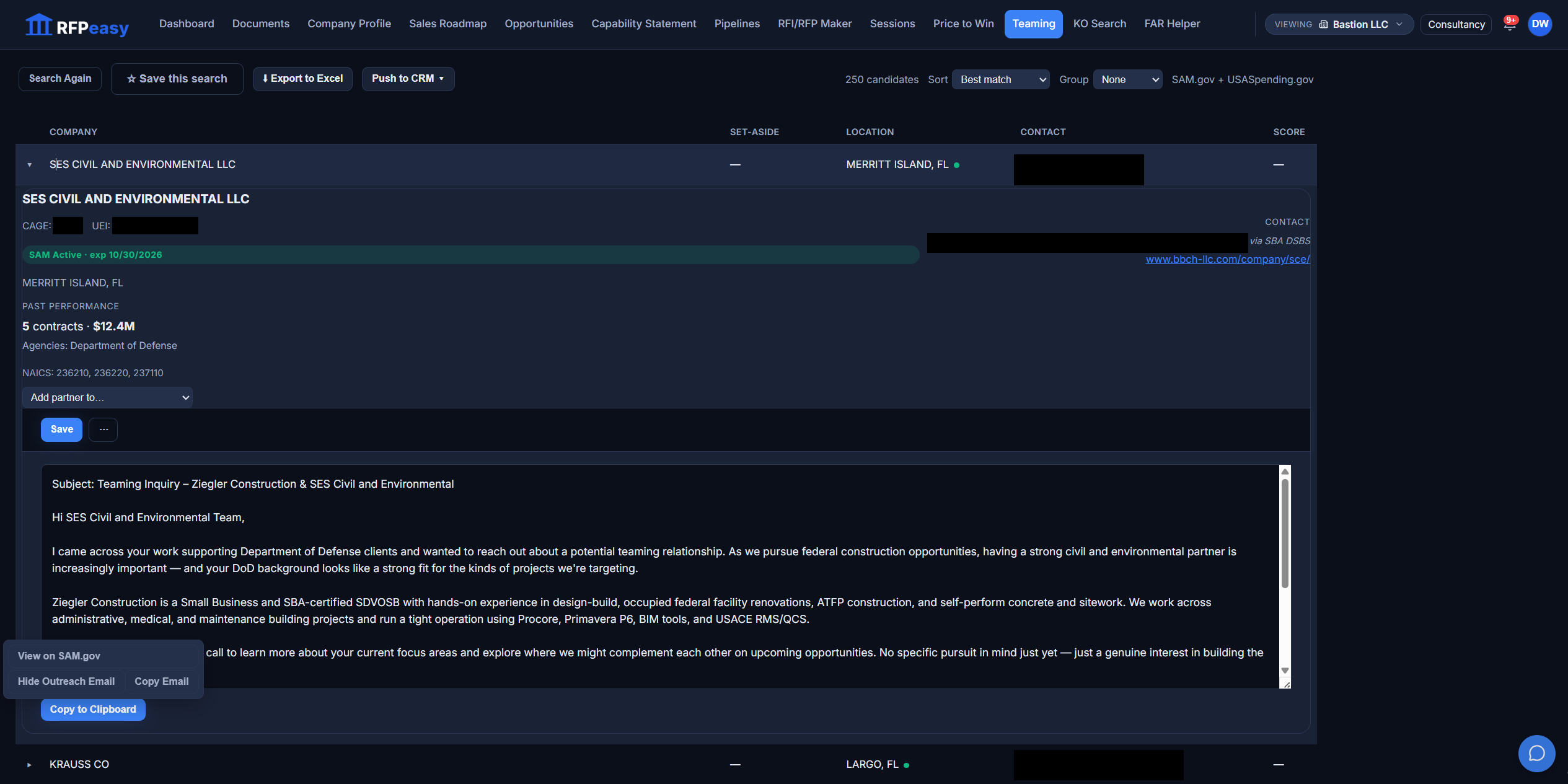
The hardest email to write is the first one to a company you have never worked with. Open any partner card and RFPeasy drafts the outreach on demand: a subject line naming both companies, an opener grounded in the federal work the partner has actually done, and an introduction of your company pulled from your own profile, certifications, tools and agencies included. Copy the draft to your clipboard, copy the contact address, or jump to the partner on SAM.gov from the same menu. Then edit it in your own voice and send it from your own inbox.
The introduction is written. You decide how it sounds.
Your bid finds its own partners.
Teaming sits between the gap you discovered and the pursuit you are building, fed by the profile and the analysis, feeding the team back into the bid.
- Company ProfileMatching and the drafted outreach are grounded in your capabilities and past performance.
- RFP / RFI MakerA flagged coverage gap becomes a seeded partner search in one click, with NAICS, agency and requirement carried in.
- OpportunitiesExpiring-vehicle and recompete rows hand you into a holders-to-team-with search.
- RFP / RFI MakerThe partner you choose is attached back to the exact gap it fills.
- Contract Monitor/PipelineAdd a partner to a tracked pursuit so the team you built stays on the record.
The contract is too big to win alone. The team is the way in.
Find the partners who close your gaps, hold the vehicles, and have delivered the work, matched and scored against your company.