Your pipeline shouldn't live in six different places.
One searchable pipeline. One place to see what matters and what happens next. See the business, not another spreadsheet.
"Which spreadsheet is the current one?"
The opportunity tracker.
The recompete spreadsheet.
The SBIR spreadsheet.
The CEO's spreadsheet.
The capture team's CRM.
The proposal calendar.
The BD person's inbox.
The SharePoint folder.
And the opportunity someone promised to track but never entered anywhere.
One pipeline. Every pursuit.
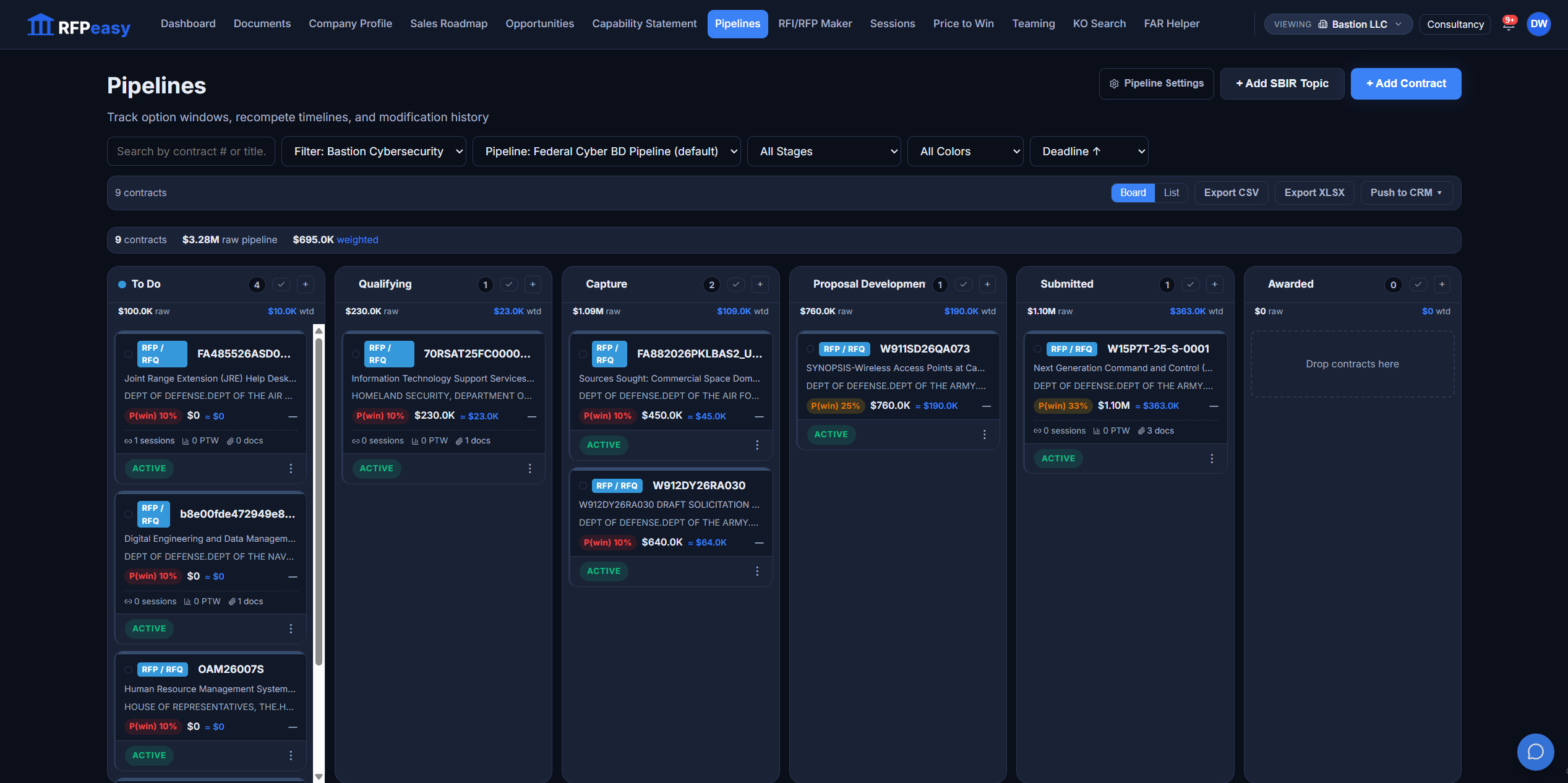
RFPeasy brings the work together instead of forcing your team to maintain separate systems for different types of opportunities. + Add Contract and + Add SBIR Topic sit on the same board: contracts, recompetes, SBIR topics, early-stage opportunities, active and submitted proposals, negotiations, awards, no-bids and losses. A company doing traditional federal contracting and SBIR work should not need two different business-development systems to understand its future revenue.
Different opportunity types. Same operating picture.
Pipeline value without probability is just a big number.
The board in the shot above reads $3.28M raw and $695.0K weighted, because a pursuit in Qualifying at 15% should not be treated like a proposal in final review. Every card carries its P(win) and its weighted value next to the ceiling, so the header totals are numbers you can actually plan against.
Big pipeline numbers feel good. Weighted pipeline numbers help you run the company.
"We're working it" isn't a stage.
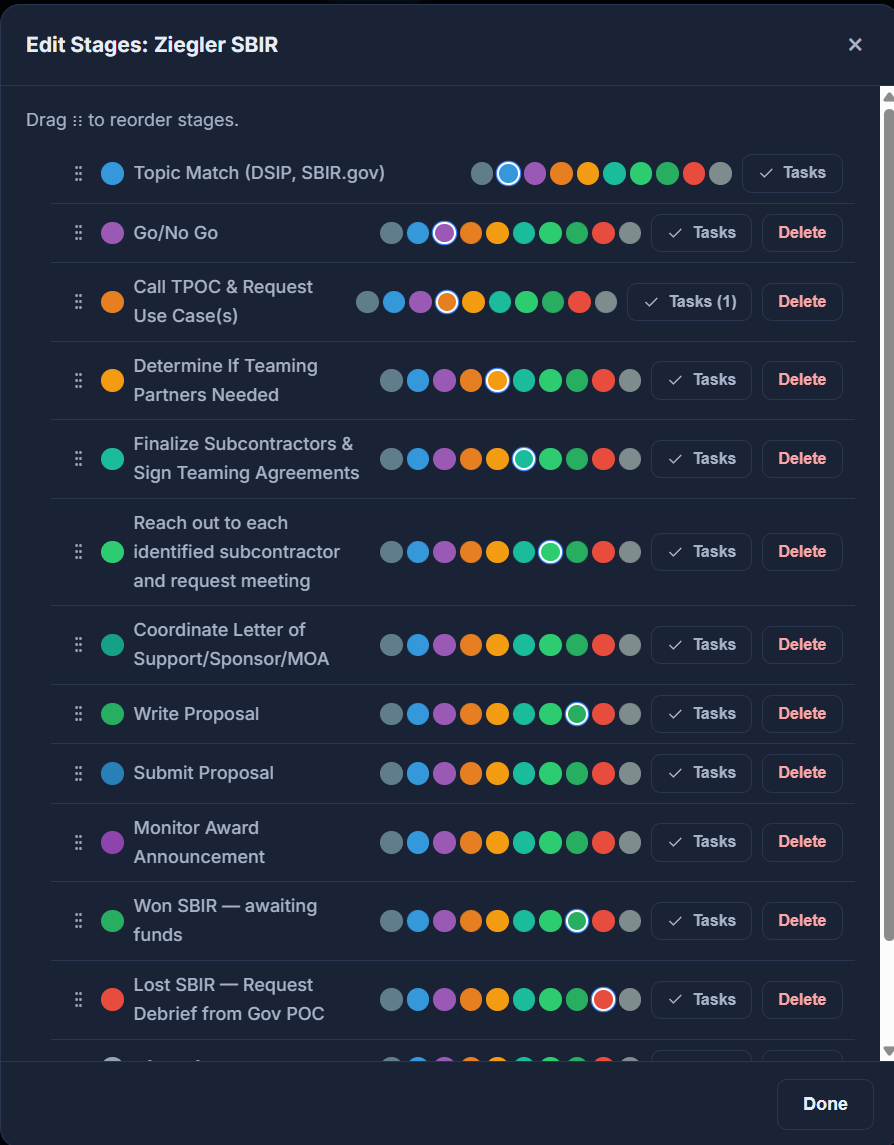
Every pursuit has a named place in a real progression, and the progression is yours to define. Edit Stages lets you rename, reorder and color every stage of a pipeline and hang a task checklist on each one. The pipeline shown here is an SBIR track with thirteen stages of its own, from Topic Match Review and Go/No-Go through TPOC contact, drafting, submission and award, because SBIR pursuits do not move like RFP pursuits.
Give every opportunity a place in the process.
One board per motion. As many as the business needs.
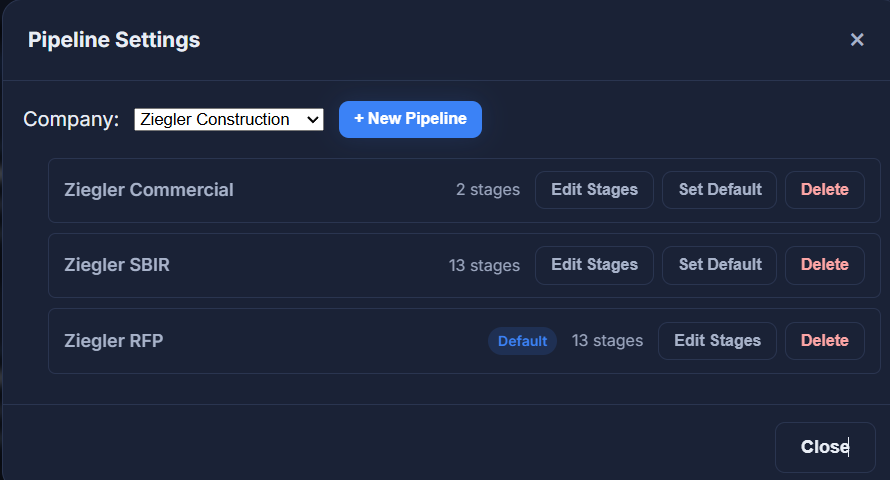
Each company gets multiple pipelines with their own stage sets (a commercial track with two stages, an SBIR track with thirteen, a default federal RFP track) and you pick the default the board opens on. Different lines of business genuinely move differently; the tool stops pretending otherwise.
Everything about the pursuit, one drawer deep.
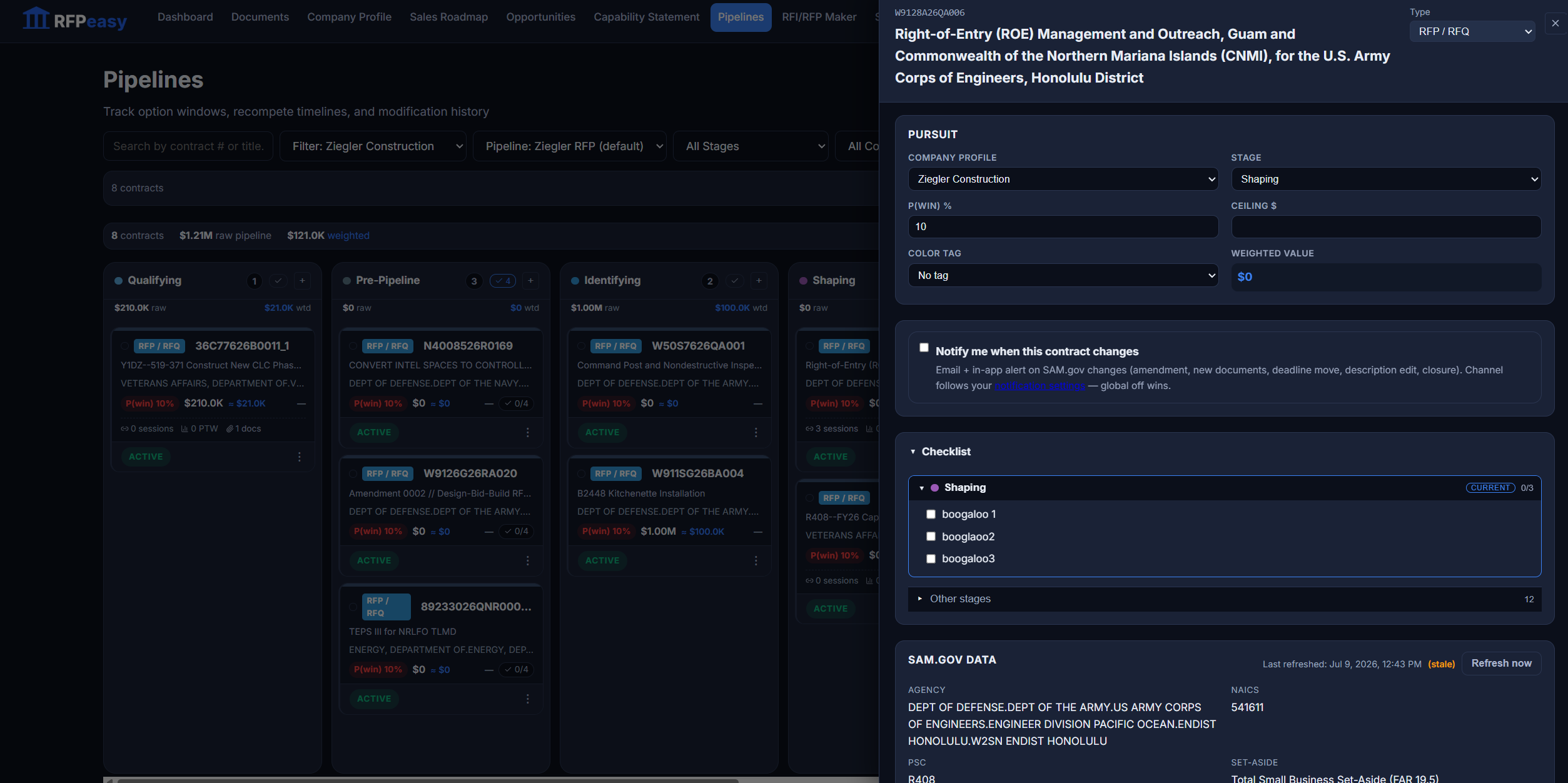
Click a card and the drawer holds the working state: stage, win probability, ceiling, color tag and computed weighted value; the pursuit's SAM.gov data (agency, NAICS, PSC, set-aside) with a freshness stamp and a refresh; and the stage's own task checklist. Turn on change alerts and RFPeasy watches the notice for you: amendments, new documents, deadline moves, description edits and closure each raise a notification instead of a surprise.
The deadline shouldn't be the moment the opportunity becomes important.
The pursuit carries the notice with it.
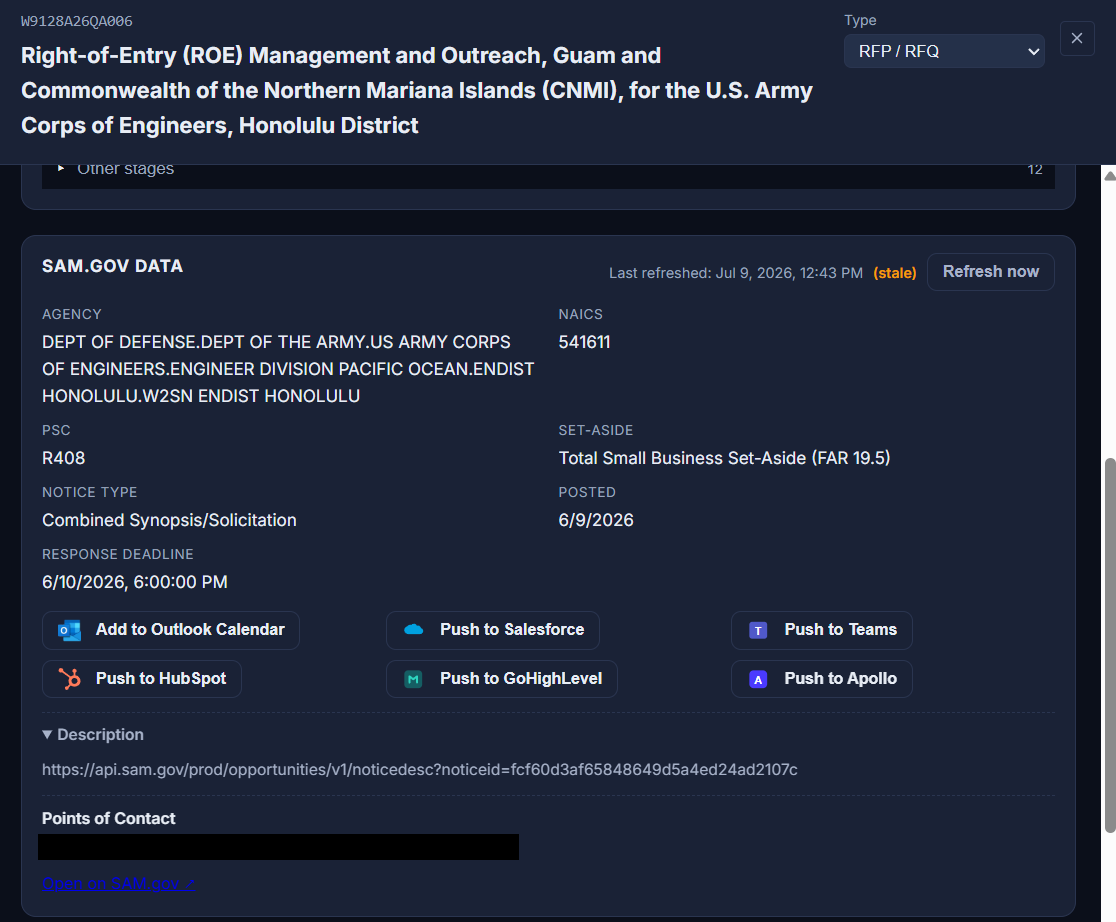
Every pursuit added from a federal notice keeps its live SAM.gov record underneath it: the full agency string, NAICS, PSC, set-aside, notice type, posted date and response deadline, with a last-refreshed stamp that says how current the copy is and a Refresh now button when it reads stale. And it pushes out in one click: the deadline to Outlook Calendar, the pursuit to Salesforce or HubSpot, the notice to a Teams channel, the contracting officer to GoHighLevel or Apollo as a contact. Nothing gets rekeyed into the CRM, and no calendar entry is typed by hand.
One source of truth on the pursuit, one click into the tools around it.
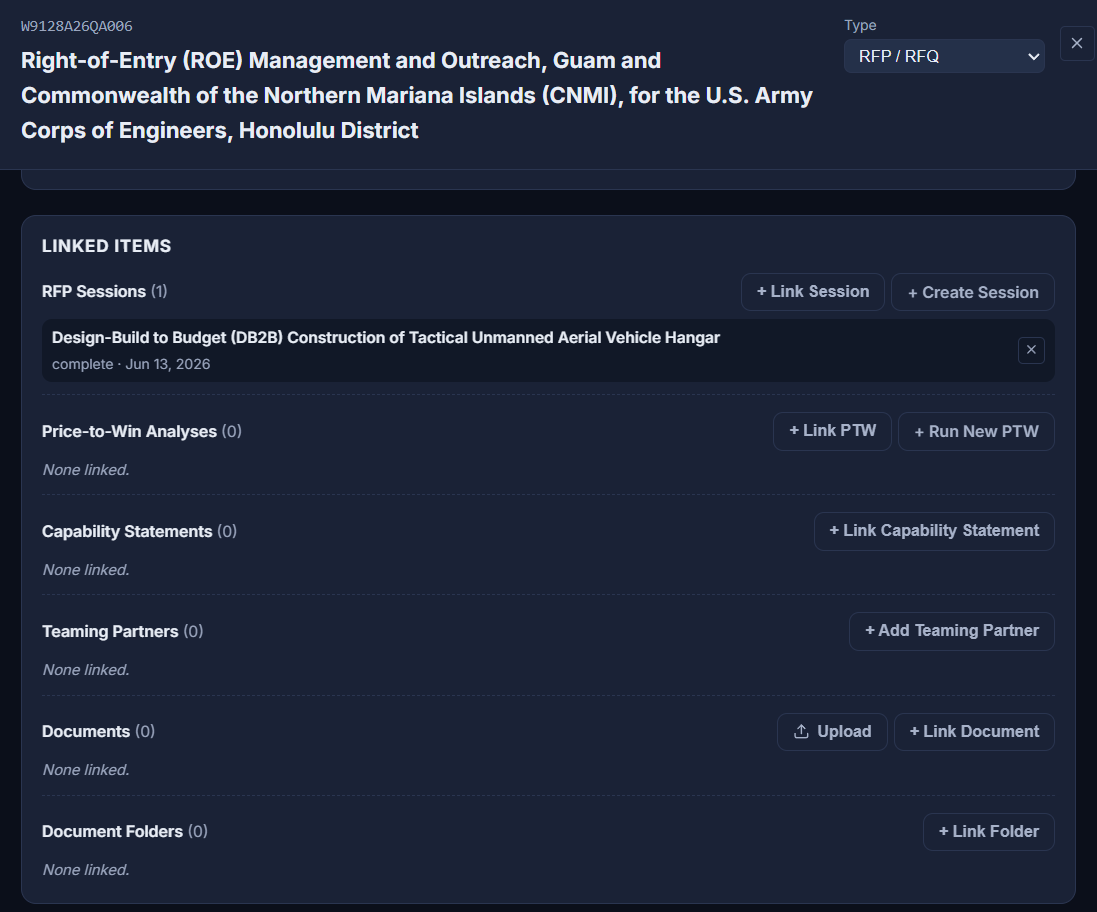
The pursuit is where the work attaches.
Linked Items is why the pipeline is not a parking lot. From the drawer, create an RFP, RFI, SBIR or OTA session on this contract (its solicitation documents carried straight in) or link one that already exists. Run a new Price-to-Win and the finished analysis links itself back; capability statements, teaming partners, documents and whole folders attach the same way.
Government contracting already has enough administrative work. Your software shouldn't create more of it.
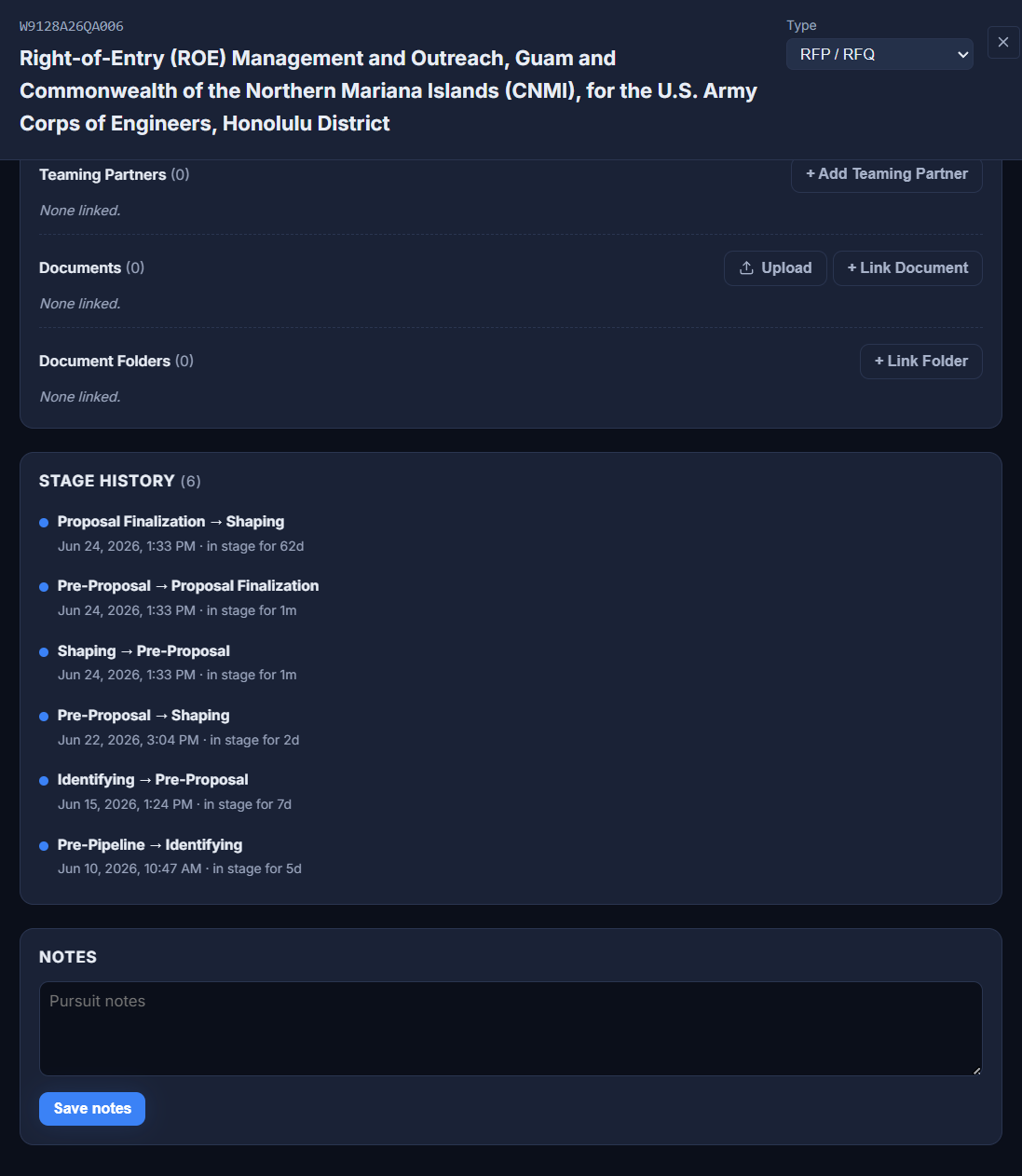
The pipeline remembers what the team forgets.
Stage History records every transition with who-moved-it-when and how long the pursuit sat in each stage: six moves from Pre-Pipeline to Proposal Submitted, timestamped, with free-form notes alongside. When leadership asks "why did this take five weeks in Shaping?", the answer is on the record, not in somebody's memory.
Search it like a system. Export it like a report.
Search by contract. Filter by company, pipeline, stage or color. Sort by deadline. A BD review, an executive review and a capture review are different questions asked of the same pipeline, and when someone still wants the spreadsheet, Export CSV or XLSX hands them one, and Push to CRM sends pursuits to the sales system your team already lives in. The spreadsheet becomes an output. Not the operating system.
Same pipeline. Different management questions.
The real before and after.
- Opportunity spreadsheet
- Recompete tracker
- SBIR tracker
- CRM
- Proposal calendar
- Leadership forecast
- "What's actually in our pipeline?"
- Search
- Filter
- Stage
- Color
- Value
- Probability
- Deadline
- Tasks
- SBIR
- Recompetes
- One operating picture.
Contract Monitor is the middle of the workflow, on purpose.
It is the operational bridge between finding work and pursuing work: opportunities land here, and every downstream artifact attaches here.
- OpportunitiesAdd to Pipeline sends any matched, searched, SLED or recompete notice here, with solicitation documents imported automatically.
- SessionsAny existing draft can be linked to a pursuit from either side.
- RFP / RFI MakerCreate Session on the drawer starts the response with the pursuit's documents, and the new session links itself back.
- Price-to-WinRun New PTW hands the estimator the contract's PDFs; the finished analysis lands back on the drawer.
- TeamingAttach the partners you are building the bid with to the pursuit itself.
- Capability StatementLink the statement you positioned with, so the pursuit record is complete.
- Document VaultDocuments and whole folders ride along with the pursuit.
Stop assembling your pipeline. Start operating from it.
Contracts, recompetes, SBIR, timelines, stages, value, probability, tasks: one place, one operating picture. Searchable, filterable, exportable, and connected to the rest of your RFPeasy workflow.